先接住乱文件
Catch the messy folder
CSV、XLSX、XLSM 都能进来;文件名只是弱线索,不把命运交给命名规范。
CSV, XLSX, and XLSM can enter. File names are weak hints, not the whole story.
我把它做成一个本地收口台:先用代码读表头、看文件、生成可跑的 profile;遇到含糊字段,再让配置好的模型搭一把手。最后输出的是看板、summary 和可复查报告,不是又一堆靠人猜的 Excel。
A local workbench for the messy middle: code reads headers, files, and column shapes first, then a configured model endpoint can help with edge mappings. The output is a dashboard, summary, and reviewable profile instead of another pile of guesswork.
产品定位
Positioning
我不喜欢把“后续可配置”写成一句空话,所以这里把适配、运行、校验和打包做成一条能重复执行的链路。换团队、换品类、换表头,都先从 profile 开始。
The point is not a pretty chart with vague promises. Adaptation, execution, validation, and packaging are one repeatable chain. New team, category, or headers: start with a profile.
CSV、XLSX、XLSM 都能进来;文件名只是弱线索,不把命运交给命名规范。
CSV, XLSX, and XLSM can enter. File names are weak hints, not the whole story.
表头、字段形态、来源线索先走本地规则,能确定的就不外发。
Headers, column shapes, and source hints are handled locally before any outside help is considered.
只有低置信度表才会走模型辅助,而且默认只给表头和字段形态,不塞整包数据。
Only low-confidence tables use model help, and the default payload is headers plus column shapes.
产物不是 PPT:file_types、field_mapping、metrics 和报告都能被下一条命令使用。
The output is not a slide: file types, field mapping, metrics, and report feed the next command.
表格适配
Table adaptation
这就是 0.3 beta 的核心:不是假装所有表头都很标准,而是承认现实很乱,然后把“猜、改、跑、复查”收成一条可追踪流程。
This is the core of 0.3 beta: do not pretend every header is clean. Accept the mess, then turn guessing, editing, running, and review into a traceable flow.
读取 CSV/XLSX/XLSM,记录表头、文件名和列形态,避免一上来就把业务数据搬出去。
Read CSV/XLSX/XLSM headers, file names, and column shapes without moving business data out first.
自动写出 file_types、field_mapping、metrics,能直接交给现有 run 命令。
Write file_types, field_mapping, and metrics that the existing run command can use directly.
API Key 只从环境变量读取;生成文件里不保存 Key,不默认发送原始行数据。
The API key is read from the environment; generated files do not store keys or raw rows by default.
python -m factory_excel_ops.cli adapt `
  --input incoming_exports `
  --output output\incoming_profile

python -m factory_excel_ops.cli validate-config `
  --file-types output\incoming_profile\file_types.json `
  --field-mapping output\incoming_profile\field_mapping.json `
  --metrics output\incoming_profile\metrics.json

python -m factory_excel_ops.cli run `
  --input incoming_exports `
  --output output\incoming_run `
  --file-types output\incoming_profile\file_types.json `
  --field-mapping output\incoming_profile\field_mapping.json `
  --metrics output\incoming_profile\metrics.json
产品系统
Product system
主视觉展示的是产品结构本身:来源 profile、指标看板、质量门禁和报表上下文,而不是与业务无关的装饰图。
The primary visual shows the product structure itself: source profiles, metric dashboard, quality gates, and review context.
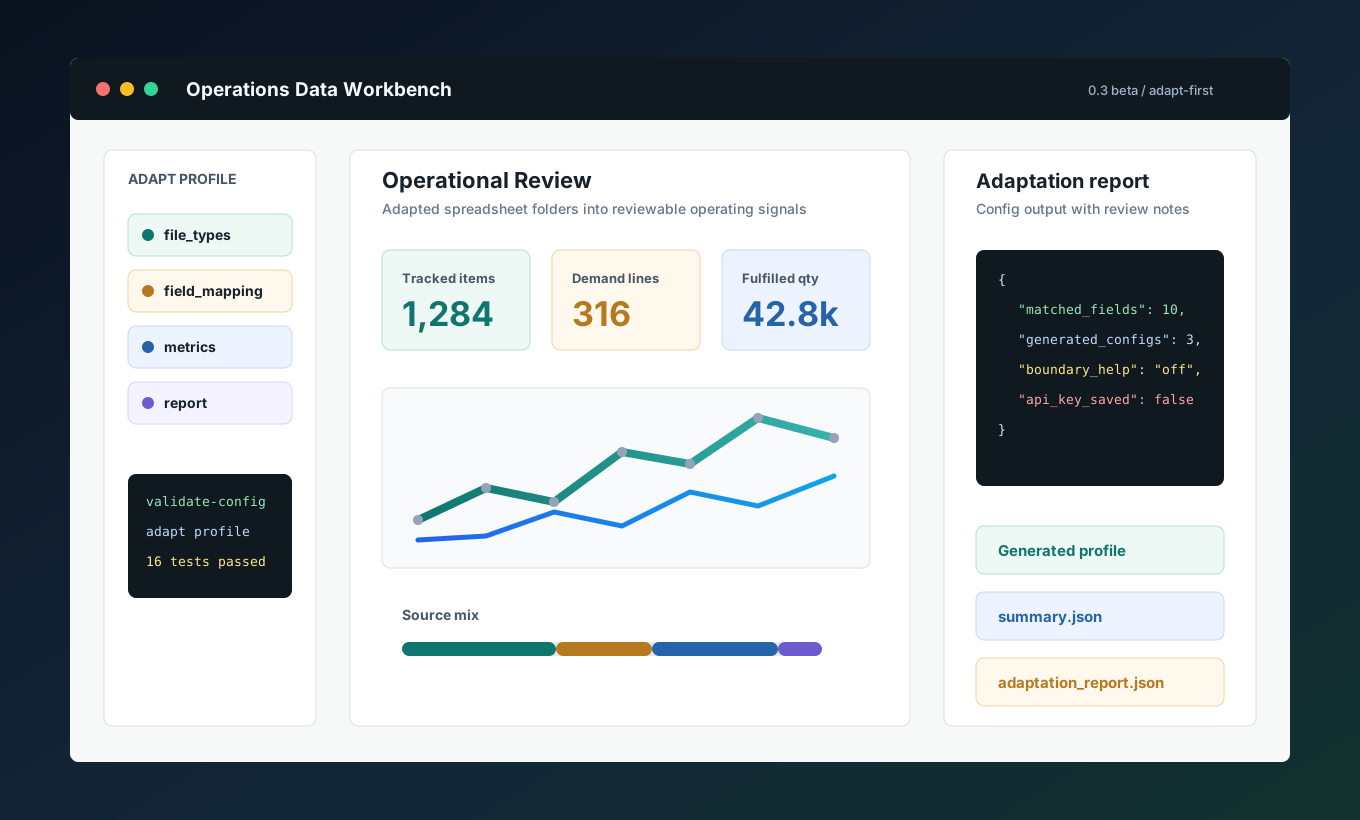
来源签名、字段别名和指标口径都在配置中表达,避免把私有模板固化到代码。
Source signatures, field aliases, and metric definitions live in config, not workbook templates embedded in code.
分类、映射、规范化和计算分别保留边界,错误更容易定位。
Classification, mapping, normalization, and calculation remain separated for easier diagnosis.
HTML 看板和 summary.json 同源,视觉展示和机器摘要不会分叉。
The HTML dashboard and summary.json share the same source, keeping visual review and machine context aligned.
analysis context 是有边界的交接格式,适合报告、检查建议和自动化任务。
Analysis context is a bounded handoff format for reports, next checks, and automation.
质量与可信度
Quality and trust
优秀数据产品不会只展示漂亮图表,还会说明数据边界、发布检查和可维护性。这里把可重复验证的质量面直接放在页面上。
Strong data products do not only show attractive charts; they expose boundaries, release checks, and maintainability. This section keeps repeatable quality evidence visible.
这些命令既是本地验证路径,也是 CI 里的核心行为。页面展示的是能被重复验证的工程状态。
These commands are both the local verification path and the core CI behavior. The page shows an engineering state that can be repeated.
python -m pytest -q
python -m factory_excel_ops.cli validate-config
python -m factory_excel_ops.cli run --input sample_data --output output
python -m factory_excel_ops.cli adapt --input sample_data --output output/adapted_profile
python -m factory_excel_ops.cli analysis-context --summary output/summary.json --output output/analysis_context.json
python scripts/package_project.py --name release-check --output output
数据边界
Data boundary
页面强调的是可移植结构:profile、pipeline、dashboard、reporting handoff。真实业务导出、内部字段规则、API Key 和部署细节保留在使用方自己的环境里。
The page emphasizes portable structure: profile, pipeline, dashboard, and reporting handoff. Real exports, internal field rules, API keys, and deployment detail stay in the user's own environment.
真实 ERP/WMS/MES 导出、客户或供应商记录、员工或订单数据、BOM、发运、财务、人事数据、私有工作簿模板、桌面二进制包、内部部署路径或操作日志。
No real ERP/WMS/MES exports, customer or supplier records, employee or order data, BOMs, shipment, finance, HR data, local workbook templates, desktop binaries, internal deployment paths, or operator logs.
可复用的分类、映射、指标、看板、分析上下文、测试、配置样例、文档和发布安全门禁。
Reusable classification, mapping, metrics, dashboards, analysis context, tests, sample configs, docs, and release safety gates.
代码与交付面
Code and delivery surface
评估者不需要在 README、源码和脚本之间来回猜。页面直接展示 adapt 命令、最小运行路径、summary 契约和发布门禁。
Reviewers do not need to guess across the README, source tree, and scripts. The page shows the adapt command, minimum run path, summary contract, and release gate together.
Developer surface
Developer surface
命令行负责适配和运行,JSON profile 负责可移植配置,HTML、summary.json 和 adaptation report 负责复查和交接。
The CLI handles adaptation and runs, JSON profiles keep configuration portable, and HTML, summary.json, plus adaptation reports support review and handoff.
01# create an isolated local workspace
02py -m venv .venv
03.\.venv\Scripts\python -m pip install -e ".[dev]"
04
05# validate config before reading records
06.\.venv\Scripts\python -m factory_excel_ops.cli validate-config
07
08# build the local dashboard and summary
09.\.venv\Scripts\python -m factory_excel_ops.cli run --input sample_data --output output
10start output\dashboard.html01# build a runnable profile from unfamiliar tables
02python -m factory_excel_ops.cli adapt --input incoming_exports --output output\incoming_profile
03
04# optional boundary help reads keys from environment variables
05$env:FACTORY_EXCEL_OPS_API_KEY = "<your key>"
06$env:FACTORY_EXCEL_OPS_MODEL_ENDPOINT = "https://your-provider.example/v1/chat/completions"
07$env:FACTORY_EXCEL_OPS_MODEL = "<model name>"
08python -m factory_excel_ops.cli adapt --input incoming_exports --output output\incoming_profile --enable-model-assist
09
10# generated: file_types.json, field_mapping.json, metrics.json, adaptation_report.json01{
02 "inventory": {
03 "headers": ["item code", "available qty"],
04 "values": ["stock", "on hand"],
05 "filename": ["inventory", "stock"]
06 },
07 "demand": {
08 "headers": ["required qty", "due date"],
09 "values": ["forecast", "order"]
10 }
11}01{
02 "file_count": 5,
03 "record_count": 14,
04 "by_source_type": {
05 "inventory": 4, "demand": 3, "fulfillment": 2
06 },
07 "metrics": [
08 {"key": "inventory_items", "value": 4},
09 {"key": "shipment_qty", "value": 50}
10 ],
11 "warnings": []
12}01python -m pytest -q
02python -m factory_excel_ops.cli validate-config
03python -m factory_excel_ops.cli run --input sample_data --output output
04python -m factory_excel_ops.cli adapt --input sample_data --output output\adapted_profile
05python -m factory_excel_ops.cli analysis-context --summary output/summary.json --output output/analysis_context.json
06python scripts/package_project.py --name factory-excel-ops-dashboard-v0.3.0-beta.1 --output output
07
08# package gate: no sensitive folders, generated output, workbooks, executables, or nested archives产品路线图
Product roadmap
0.3 beta 已经把“任意表格先适配”落到命令行、测试和 CI。后续继续围绕审计表、导出能力和本地服务打磨。
0.3 beta turns table adaptation into CLI, tests, and CI. Next work tightens audit tables, exports, and local serving.
代码、profile、适配报告、测试、质量门禁和交付说明保持在同一套产品结构里;接入真实业务时,重点替换配置和本地适配层。
Code, profiles, adaptation reports, tests, quality gates, and delivery notes stay in one product structure. Real business adoption mainly replaces configuration and local adapter layers.